Table of Contents
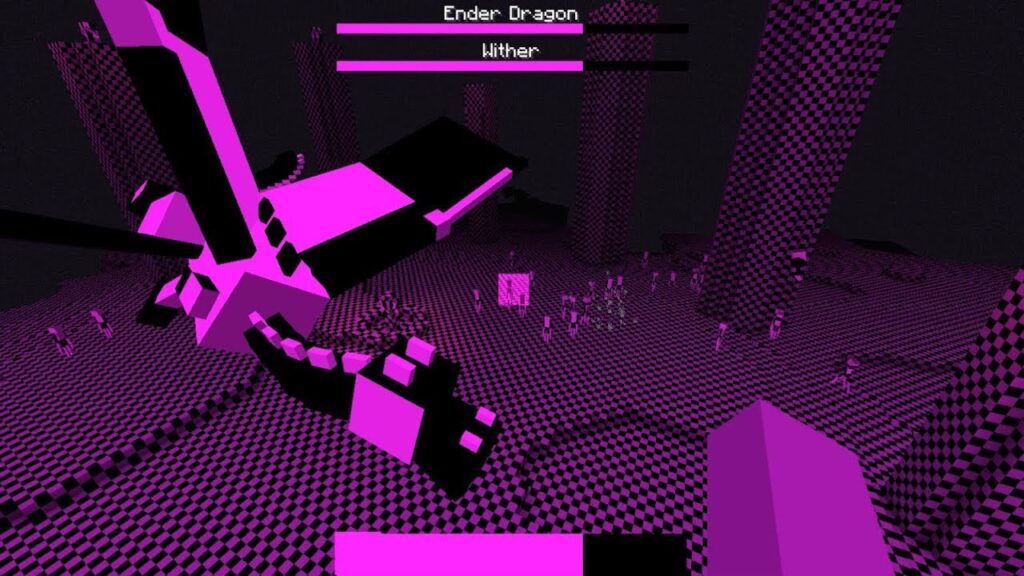
Perhaps you have faced problems where objects, maps, or models were appearing in pink and black colors in your game. Well, this problem is experienced in various Source Engine games, like Counter-Strike: Source, Garry’s Mod, and many others. The reason behind the pink and black patterns in your game model is simply that the texture file needed for the model is not found.
This article will guide you about the causes of pink and black textures and their solutions as well.
Definition of Pink and Black Textures
Pink and black textures refer to temporary textures created by the Source Engine when the actual textures are not found.
In such situations, the game will use a very noticeable checkered texture pattern. This makes it easy for both players and developers to identify the missing textures.
The following issues have been known to occur:
• Pink and black walls
• Lost building textures
• Pink and black weapons
• Damaged player models
• Invisible textures
• Texture errors in custom maps
What Makes Pink and Black Textures Appear?
There are various reasons behind this problem.
1. Lack of Game Assets
Most custom maps need to have textures from other Source Engine games.
For instance:
• Maps for Garry’s Mod may need textures from the Counter-Strike: Source game.
• Community-made maps require the Half-Life 2 textures.
• Game Workshop assets might require additional game files.
In case those textures are missing, textures will look pink and black.
2. Damaged Game Assets
Files can be corrupted because of:
• Interruption during downloading
• Issues with hard drives
• Uncontrolled shut-downs
• Mod incompatibilities
3. Incorrect Addon Installation
Players manually install:
• Maps
• Texture packs
• Models
• Mods
If any of these files are not installed in the correct directories, the game cannot locate them.
4. Missing VTF Files
A VTF (Valve Texture Format) file contains texture information for Source Engine games.
In the event that a VTF file is missing, the game will display a pink and black checkerboard texture.
5. Missing VMT Files
A VMT (Valve Material Type) file informs the game how to apply the texture.
Despite the presence of a VTF file, if a VMT file is missing, it will also cause issues.
6. Issues with Workshop Downloads
Some Steam Workshop items may fail to download properly.
Consequently, there may be an issue with:
• Missing textures
• Missing models
• Broken maps
7. Problems with Server Content
Joining server content might result in an inability to download resources correctly in:
• Garry’s Mod
• Counter-Strike: Source
• Team Fortress 2
Quick Reference Table: Causes and Fixes for Pink and Black Textures
| Problem | Possible Cause | Recommended Fix |
|---|---|---|
| Pink and black checkerboard textures | Missing texture files | Verify game files and reinstall missing content |
| Missing textures in Garry’s Mod | Counter-Strike: Source content not installed | Install and mount CSS content |
| Broken custom map textures | Missing map resources | Download required map files |
| Missing weapon textures | Corrupted addon files | Reinstall the addon |
| Invisible objects with pink textures | Missing VTF files | Restore or replace VTF files |
| Texture errors after installing mods | Incorrect file paths | Check materials folder structure |
| Workshop content not loading | Incomplete Steam Workshop download | Unsubscribe and resubscribe to the addon |
| Server-specific texture issues | FastDL or server content problem | Clear downloaded content and reconnect |
| Textures disappeared after update | Corrupted game files | Verify integrity of game files |
| Texture pack causing errors | Mod conflict | Disable or remove texture packs |
How to Remove Pink and Black Textures
Here are the best methods for you.
Solution 1: Check the Game Files
What you can do at first is to check your game files on Steam.
Instructions
1. Launch Steam.
2. Go to Library.
3. Right-click the game.
4. Choose Properties.
5. Click on Installed Files.
6. Choose Verify Integrity of Game Files.
In this way, all the damaged files will be automatically checked and replaced by Steam.
Solution 2: Installation of Game Assets
In case of missing game assets for custom maps, you need to install the following games:
• Counter Strike: Source
• Half Life 2
• Team Fortress 2
Then mount these games in Garry’s Mod
How to Mount Game Assets in Garry’s Mod?
1. Open the Garry’s mod.
2. Go to main menu.
3. Click on Games.
4. Turn on all your installed Source Engine games.
5. Restart the Garry’s Mod.
Usually, missing textures are fixed right away.
Solution 3: Install Missing Addons Again
When there is a problem with specific addons, do the following:
1. Unsubscribe from that add-on.
2. Restart Steam.
3. Subscribe to it again.
4. Allow the installation process.
Corrupted workshop download is one of the major reasons behind the texture issues.
Solution 4: Delete Cache Files from Workshop
Corrupted Workshop files sometimes result in missing textures.
Location of Workshop cache files in Garry’s Mod
Steam\steamapps\common\GarrysMod\garrysmod\cache
Delete everything inside this folder and restart the game.
Solution 5: Verify Directory Structure for Custom Texture Materials
When creating custom textures, make sure that the following directory structure is present:
materials/
└── custom/
└── texture.vtf
└── texture.vmt
Otherwise, the game will not be able to find these files.
Solution 6: Reinstall Missing VTF Textures
If you are working on your mods or custom maps:
1. Look in the material folder.
2. Find out whether the VTF file exists.
3. Replace the missing files.
4. Recompile the addon if needed.
Popular texture directory:
materials/custom/
Solution 7: Examine VMT File
Open the VMT file in any text editor.
Example:
LightmappedGeneric
{
“$basetexture” “custom/brickwall”
}
Make sure that the path specified in the line corresponds to the name of the VTF file.
Incorrect references will generate pink & black textures.
Solution 8: Troubleshoot Fast Download Issues
If you have problems while playing on a multiplayer server only:
For Server Owners:
• Check FastDL configuration.
• Restore missing materials.
• Make sure that resources match server version.
For Players:
• Delete existing downloaded content.
• Reconnect to the server.
Solution 9: Disable Conflicting Texture Packs
Sometimes, some texture packs can override material properties.
Try the following steps:
1. Disable texture packs.
2. Remove recent mods.
3. Restart the game.
If the texture problem gets fixed, the problem was in the texture pack.
Solution 10: Reinstallation of the Game
If all else fails, try:
1. Save your progress.
2. Uninstall the game.
3. Delete the leftover directories.
4. Reinstall the game using Steam.
How to Fix Pink and Black Textures in Garry’s Mod
It seems that players of Garry’s Mod face this problem most often.
The Most Common Solutions
✓ Install Counter-Strike: Source
✓ Mount CSS content
✓ Reinstall workshop addons
✓ Verify game files
✓ Clear cache
✓ Get missing map resources
Quite often, the only thing that needs to be done is installing Counter-Strike: Source.
How to Fix Pink and Black Textures in Counter-Strike: Source
For CSS users:
Recommended Steps to Try
• Verify game files.
• Remove custom texture packs.
• Reinstall custom maps.
• Check workshop content.
• Update graphic card drivers.
How to Stop Pink and Black Textures
Adhere to the following guidelines:
- Update Games Regularly
- Make sure you have all updates.
- Install Reliable Addons
- Download mods only from reliable sites.
- Have Backups of Custom Material
- Create backups of your vital VTF and VMT files.
- Don’t Use Incomplete Downloaded Mods
- Let Steam Workshop downloads complete.
- Organize Material Files Carefully
- Properly arrange material files when making mods.
What Are VTF and VMT Files?
This information is very valuable for modders and developers.
VTF (Valve Texture Format)
Contains:
• Texture images
• Mipmaps
• Compressed texture information
• Transparency info
VMT (Valve Material Type)
Manages:
• Texture paths
• Reflections
• Transparency
• Behavior under lighting conditions
• Surface and material properties
Both file types must exist.
Tools for Your Help
Some tools that can help you:
VTFEdit
For:
• VTF viewer
• Texture creation
• Image conversion
GCFScape
For:
• Asset extraction
• Texture access
Hammer Editor
Lets developers view materials used in maps.
They are really useful when creating content for the Source Engine.
FAQs
Why do my textures look pink and black in Garry’s Mod?
Most likely, it means that your game lacks some Counter-Strike: Source content or addon files.
Can missing VMT files make textures pink and black?
Yes, even if the texture image file exists, missing VMT files will not allow material loading.
Is Counter-Strike: Source installation necessary for running Garry’s Mod?
Most of the custom maps require this game. Installing and mounting the game will probably solve your problem.
Does file verification resolve texture problems?
It depends on the problem. In most cases, file verification will help.
Can addons cause texture problems?
Of course, broken or corrupt Workshop downloads are one of the most common problems.
Conclusion
A game having pink and black textures shows that some required texture files are not located properly. Most likely, this is because of missing content, corrupt workshop files, wrong addon installation or other issues.
Some quick solutions include:
1. File verification
2. Installing required Source Engine games
3. Redownloading addons causing problems
4. Deleting the workshop cache directory
5. Fixing texture file locations
Using the aforementioned techniques, you will be able to easily fix texture problems in Garry’s Mod.