GIF to VTF Converter – Convert GIF to VTF Online
If you work with Source Engine games, custom textures, game modifications, animated materials, or other game-development projects, you may need to convert an animated GIF into Valve Texture Format. Our GIF to VTF converter provides a simple way to process an animated GIF and create a multi-frame VTF texture directly in your browser.
The GIF to VTF process is useful when an animation created as a GIF needs to be prepared for a compatible Source Engine texture workflow. Instead of manually extracting every frame from a GIF and building a texture file, this online tool can automate the frame-processing part of the workflow.
What Is GIF to VTF?
GIF to VTF refers to converting a GIF image or animated GIF into Valve Texture Format, commonly known as VTF. GIF is a popular image format that can store multiple frames and is frequently used for short animations. VTF is a texture format associated with Valve’s Source Engine ecosystem.
When an animated GIF is converted to VTF, its individual animation frames can be stored as frames inside the resulting texture. This makes the GIF to VTF converter useful for people creating animated textures and custom game assets.
Why Use a GIF to VTF Converter?
Manually converting an animated GIF can require several steps. You may need to extract the GIF frames, prepare their dimensions, convert the images, and then combine them into a VTF texture. A dedicated GIF to VTF converter reduces the amount of manual work required.
The tool can be useful for Source Engine modders, texture artists, game developers, gaming communities, and users who create custom game content. It can also help beginners understand how animated image frames can be prepared for a texture workflow.
How to Convert GIF to VTF
Using a GIF to VTF converter is straightforward. Follow these steps:
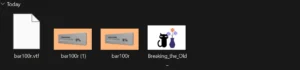
- Select an animated GIF from your computer or mobile device.
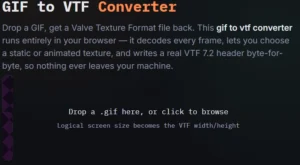
2. Upload the GIF into the converter.
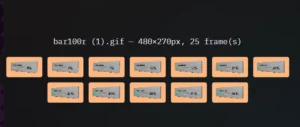
3. Allow the tool to read the GIF animation frames.
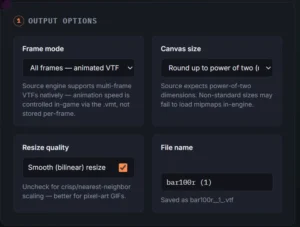
4. Review the frame count and image dimensions.
5. Select your preferred VTF format.
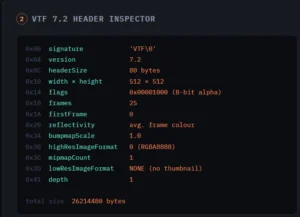
6. Select a maximum texture size if required.
7. Choose whether mipmaps should be generated.
8. Click Convert GIF to VTF.
9. Download the generated VTF file.
Convert Animated GIF to VTF
Animated GIF files are different from ordinary static images because they can contain many frames. A properly designed GIF to VTF converter needs to process those frames rather than simply treating the GIF as a single picture.
This tool extracts the frames and creates a multi-frame VTF texture. The result can then be used in compatible workflows where animated VTF textures are supported.
GIF to VTF for Source Engine Projects
VTF is widely associated with Valve’s Source Engine texture system. Developers and modders use VTF files for many types of game textures and materials.
A GIF to VTF converter can therefore be useful when an animated graphic needs to become part of a Source Engine-related project. For example, a creator could design a short animation as a GIF and then convert its frames into a VTF texture.
The exact requirements can vary between games and engine versions. Material configuration, texture dimensions, alpha support, and animation settings may also affect how the final texture behaves.
GIF to VTF Online
An online GIF to VTF converter can be convenient because you do not necessarily need a separate desktop application for the basic conversion process. The browser can read the selected GIF, process its frames, and generate the VTF file.
This approach is particularly useful for users who want a quick conversion workflow without installing additional image-editing software.
Features of This GIF to VTF Converter
- Animated GIF frame extraction
- Multi-frame VTF output
- GIF preview
- Frame information
- Image dimension information
- Multiple VTF format options
- Optional texture resizing
- Mipmap option
- Drag-and-drop upload
- Browser-based conversion
- Downloadable VTF output
- Responsive design for desktop and mobile
GIF to VTF vs PNG to VTF
PNG and GIF are commonly used for different types of image content. PNG is normally used for static images, while GIF can contain multiple animation frames.
If you have a static PNG image, a PNG to VTF converter may be more suitable. If you have an animated GIF, a GIF to VTF converter is designed specifically for processing the animation frames.
How to Prepare a GIF Before Conversion
Before using the GIF to VTF tool, check the animation carefully. Remove unnecessary frames if the animation is extremely long. You should also avoid unnecessarily large dimensions because high-resolution animations can increase processing time and output size.
For game textures, square dimensions such as 128×128, 256×256, or 512×512 may be convenient depending on your specific project. Always check the requirements of the game or Source Engine application you are targeting.
Who Can Use a GIF to VTF Converter?
A GIF to VTF converter can be useful for:
- Source Engine modders
- Game developers
- Texture designers
- Gaming communities
- Steam Workshop creators
- Custom content creators
- Game asset designers
- Source Engine enthusiasts
Is GIF to VTF Conversion Free?
A free online GIF to VTF converter allows users to experiment with animated textures without purchasing specialized conversion software. This tool is designed to provide the basic conversion workflow directly through a web browser.
Frequently Asked Questions About GIF to VTF
What is a GIF to VTF converter?
A GIF to VTF converter is a tool that processes GIF image frames and creates a Valve Texture Format file suitable for compatible Source Engine workflows.
Can I convert an animated GIF to VTF?
Yes. This converter is designed to extract animation frames and create a multi-frame VTF texture.
Can I convert GIF to VTF online?
Yes. The conversion tool works directly in a modern web browser, so users can select a GIF and generate a VTF file without using a traditional desktop interface.
Does the converter support GIF animation?
Yes. The converter reads the individual frames of an animated GIF and uses those frames when creating the VTF output.
What size GIF should I use?
For smoother browser processing, smaller GIF files with reasonable dimensions and frame counts are recommended. Extremely large animations may require substantial memory.
Conclusion
The GIF to VTF converter provides a convenient workflow for turning animated GIF files into multi-frame VTF textures. Whether you are a Source Engine modder, game developer, texture designer, or gaming enthusiast, converting GIF to VTF can make it easier to prepare animated assets for compatible projects.
Instead of manually extracting every GIF frame and preparing the images individually, you can use this GIF to VTF tool to simplify the process. Upload your animation, review the available information, choose your settings, convert the file, and download the resulting VTF.