VTF Viewer – View VTF Files Online
A VTF Viewer is a useful tool for opening and previewing Valve Texture Format files without requiring you to convert the texture into another image format first. VTF files are commonly associated with Valve’s Source Engine and can contain textures used by games, modifications, maps, materials, and other custom content.
Our online VTF Viewer provides a simple way to upload a VTF file and inspect its texture directly from a web browser. Instead of installing a dedicated texture application, you can use the browser-based viewer to quickly check a VTF file, its dimensions, animation frames, and visual appearance.
What Is a VTF Viewer?
A VTF Viewer is software or an online utility designed to open Valve Texture Format files. VTF stands for Valve Texture Format and is a texture format used within the Source Engine ecosystem.
VTF files can contain different types of texture information, including color data, transparency, mipmaps, and in some cases multiple frames for animated textures. A dedicated VTF file viewer makes it easier to inspect these textures.
View VTF Files Online
An online VTF viewer can be useful when you quickly need to inspect a texture but do not want to install additional software. Upload the VTF file and the viewer can process the texture inside your browser.
This can be convenient for developers, modders, texture artists, and users who regularly work with Source Engine files. A browser tool is also useful when you are working on a different computer where your usual texture software is not installed.
How to Use the VTF Viewer
Using an online VTF Viewer is simple. Follow these basic steps:
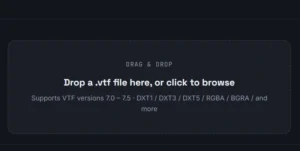
- Open the VTF Viewer page.
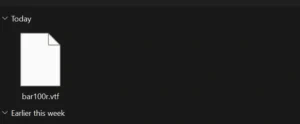
2. Select a VTF file from your device.
3. Wait for the file to be processed.
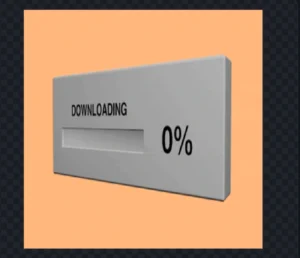
4. View the texture in the preview area.
5. Check the width, height, and frame information.

6. Than click on Download Option.
Why Use a VTF File Viewer?
VTF files are not ordinary JPG or PNG images. Because they are stored using Valve’s texture format, normal image viewers may not recognize them. A dedicated VTF file viewer can interpret the texture data and display the image.
This is especially useful when working with game modifications. For example, if you download a custom texture and want to verify what it looks like before placing it inside a game directory, an online VTF Viewer can save time.
VTF Viewer for Source Engine Textures
The Source Engine uses VTF files for many texture-related tasks. Modders and developers may encounter VTF files while creating custom materials, game modifications, sprays, maps, interfaces, and other assets.
A VTF Viewer allows you to visually inspect these files before using them in your project. This can help identify incorrect textures, missing transparency, unexpected colors, incorrect dimensions, or other visual problems.
VTF Texture Preview
A useful VTF texture viewer should provide more than simply displaying an image. Texture information can help you understand how a particular file is structured.
Depending on the VTF file and viewer implementation, useful information may include texture width, height, number of frames, image format, mipmap information, and other metadata.
Animated VTF Files
Some VTF textures can contain multiple frames. These textures can be used for animated materials and other visual effects.
When a VTF file contains multiple frames, a capable VTF Viewer can allow users to inspect different frames rather than viewing only the first image.
VTF Viewer for Game Modding
Game modders frequently work with texture files while creating custom content. A VTF Viewer can make the workflow easier by allowing textures to be checked before they are added to a game or modification.
For example, if you have downloaded a collection of VTF files, you can use a VTF Viewer to inspect the files and determine which texture corresponds to a particular asset.
Benefits of an Online VTF Viewer
- No traditional image conversion is required for previewing.
- Works directly in a modern web browser.
- Useful for quickly checking VTF textures.
- Can display texture dimensions.
- Can provide frame information.
- Useful for Source Engine modders.
- Convenient for texture designers.
- Useful when working on computers without dedicated VTF software.
VTF Viewer vs Converting VTF to PNG
There are situations where converting a VTF file to PNG is useful. PNG is supported by almost every image viewer and image editor. However, if your goal is simply to inspect a texture, converting the file first can add an unnecessary step.
A VTF Viewer lets you preview the texture directly. If you need to edit the image in a standard image editor, you may then choose to convert the VTF to PNG or another supported format.
Who Can Use a VTF Viewer?
An online VTF Viewer can be useful for:
- Source Engine modders
- Game developers
- Texture artists
- Map creators
- Gaming communities
- Steam Workshop creators
- Game asset designers
- Students learning game development
- Users troubleshooting game textures
Is the VTF Viewer Free?
A free online VTF Viewer can provide a convenient way to inspect compatible VTF files without purchasing dedicated texture-viewing software.
The browser-based approach is particularly useful for quick inspection. For advanced texture editing, however, specialized desktop software may still provide additional features.
Common VTF Problems
Sometimes a VTF file may not display correctly. Possible reasons include an unsupported VTF version, unsupported image format, corrupted file data, unusual texture settings, or browser limitations.
If a VTF file does not open, try another known-good VTF file. You can also verify that the file has not been damaged during download or transfer.
Frequently Asked Questions About VTF Viewer
What is a VTF Viewer?
A VTF Viewer is a tool that opens and previews Valve Texture Format files.
What does VTF stand for?
VTF stands for Valve Texture Format. It is associated with textures used by Valve’s Source Engine.
Can I view VTF files online?
Yes. An online VTF Viewer can process compatible VTF files directly in a modern web browser.
Can VTF files contain animation?
Yes. Some VTF files can contain multiple frames. A viewer that supports multi-frame textures can allow users to inspect those frames.
Is VTF the same as PNG?
No. PNG is a general-purpose image format, while VTF is a texture format associated with Valve’s Source Engine.
Do I need to install a VTF viewer?
Not necessarily. A browser-based VTF Viewer can allow compatible files to be previewed online.
Conclusion
The VTF Viewer provides a convenient way to inspect Valve Texture Format files without first converting them to another image format. Whether you are a Source Engine modder, game developer, texture artist, or gaming enthusiast, an online VTF viewer can make texture inspection faster and easier.
Instead of installing additional software simply to check a texture, you can upload a compatible VTF file and preview it directly in your browser. The ability to inspect dimensions and multiple frames can also help when troubleshooting or preparing textures for a Source Engine project.
For users who frequently work with Source Engine assets, keeping a reliable VTF Viewer available can make the texture-development workflow more convenient.